VB Magic

2012/09/21

Sort of found the answer to my sharing issue with WinRT & Dropbox

Filed under: Windows 8, Windows Store App — Tags: , , , — vbmagic @ 8:21 pm

It turns out, if you have the same folder location on two different machines. E.g. the default drop box location c:\users\{user}\dropbox,  this makes the project fail to run on a the machine that wasn’t the one it was created on.

If you move the dropbox folder to a new location on the other machine, E.g. c:\Dropbox then it will run with no issues. A weird one this, no one had an answer to why it happens.

Hopefully if someone else has this issue, then this post may help them.

BTW: The person at the Workshop seemed to be taken aback that the app was written using VB too 😉

2012/09/18

Windows Store App (Was Metro) And Shared Files

Filed under: Windows 8, Windows Store App — Tags: , , , — vbmagic @ 6:08 pm

Just a quick post about an issue I came across when trying to develop and app and share the files between my Laptop and Desktop via Dropbox.

I use this method quite successfully for most of my development work, but it seems different for Windows 8 Metro App Store development.

Problem

I build a windows store app on my Desktop and store the resultant solution in my dropbox directory structure. It builds and runs fine. I go to the office and load the application via my laptop. So far it all seems ok. It builds with no issues. But when you run it, you get an Application Failed to start error message. And looking into the exception, it boils down to a COM error:

“Error HRESULT E_FAIL has been returned from a call to a COM component.” err -2147467259

Next I created a similar app on the laptop it built and ran okay and then I loaded the app on my desktop and exactly the same thing happened.

Solution

Hopefully I’ll find out Friday at the Windows 8 DevCamp in London (21st September).

2012/07/19

Taking a IIS pre-generated web service and putting into Azure

Filed under: Azure, Learning, SQL Azure, VB.NET — Tags: , , , , — vbmagic @ 3:11 pm

I had, what I thought, was a simple job to do; but it took over two weeks of discovery to find out it actually was easy, but not quite in the way I was planning to do it.

I had two web services that I needed to host in Azure. For a temporary measure, I create a single Azure instance and this had a simple elevated start up task that installed required run-times and then downloaded 7zip file from Azure storage and then extracted this file.

I then connected to the instance via remote desktop, launched IIS Manager and created the web applications there. I also manually started a back end process.

The next step was to try and automate the deployment of this process using two instances. I moved the required database into SQL Azure which worked fine.

Next I created a new C# Azure project with an ASP.net web role and added the tasks to install the runtime and also looked up the commands required to add the website applications.

I hit a problem that I never really managed to solve where the installation of the C++ 10 runtime would just hang the start-up task. After spending around three days trying to diagnose what had happened I decided to start again from scratch.

I created a new VB Azure project with an ASP.net web role. I added the same task which ran a batch file. This time round the run-times installed with no problem. (I guess I’ll never know what went wrong with that one)

The next part of the script was to download and extract the 7zip archive file. (To download from storage I used the Azure Command Line tools from Rob  Blackwell/Two10 Degrees: https://github.com/RobBlackwell/AzureCommandLineTools)

I then extracted the archive using 7zip command line tools (http://www.7-zip.org/download.html)

It was when I came to run AppCmd.exe to add the extracted web applications, I learned about the order that Tasks etc. are run in Azure. (After a day or so of tracking things down)

The following article helped clarify this a lot. (I’ve borrowed the picture from the article below) http://msdn.microsoft.com/en-us/library/windowsazure/hh127476.aspx

Azure Startup flow chart

Azure Startup flow chart


So basically, any start-up tasks would not be able to run scripts that try to modify the website (Like adding the web applications). I abandoned that idea.

Now there is an Elevated Simple task which installs the required run-times and downloads and extracts the files required.

Then there is an Elevated Foreground task which starts the back end process.

All that was left to do was get the web applications (Which were extracted by the Simple Task onto the C: drive)

After a lot more web searching I decided to modify the service definition file for the website and added the virtual applications to this file. (As described in this article: http://msdn.microsoft.com/en-us/library/windowsazure/gg433110.aspx )

I pointed the physical directory to where the application will be extracted to on the C drive of the instance. This caused a build error saying it couldn’t find the directories. I created these directories on the C drive of the machine I was publishing from which allowed the publish to complete.

Unfortunately the deployment got stuck in busy until I deleted it. (Waited a good few hours and tried a couple of times just in case of a “Glitch”).

As a last resort, I extracted the web applications and added the files to the web role’s project folder and then included them into the project. Next I modified the physical directory to a relative directory pointing to the included application directories.

Published and to my great surprise it actually work. Phew!

Took a few weeks but was a great learning process (If a bit frustrating at times 😉 )

Jas

2012/06/24

.Net Micro-Framework and VB.net on Fez Spider…A couple of Gotcha’s

Filed under: .NET, C#, Fez Spider, Gadgeteer, VB.NET — Tags: , , , — vbmagic @ 11:50 am

Hi,

I’m at last coding in VB.net with the .net Microframework thanks to the hard work of the people at GHI converting libraries over to use .netmf 4.2

There are a couple of gotcha’s I’ve come across so far converting my Tyrannt game over to VB.

Firstly there is a small problem with the Auto-generated code for resouces which I expect will be fixed by the time the release comes out of Beta.

Inside the code-behind Resources.Designer.vb

Namespace TyranntVB
    Partial Friend Class Resources
        Private Shared manager As System.Resources.ResourceManager
        Friend Shared ReadOnly Property ResourceManager() As System.Resources.ResourceManager
            Get
                If (Resources.manager Is Nothing) Then
                    Resources.manager = New System.Resources.ResourceManager("TyranntVB.Resources", GetType(Resources).Assembly)
                End If
                Return Resources.manager
            End Get
        End Property

You’ll notice there is a Namespace being used. This is what is required in C# but not in Visual Basic. If you remove the Namespace commands

Partial Friend Class Resources
    Private Shared manager As System.Resources.ResourceManager
    Friend Shared ReadOnly Property ResourceManager() As System.Resources.ResourceManager
        Get
            If (Resources.manager Is Nothing) Then
                Resources.manager = New System.Resources.ResourceManager("TyranntVB.Resources", GetType(Resources).Assembly)
            End If
            Return Resources.manager
        End Get
    End Property

Code like this

Resources.GetFont(Resources.FontResources.tyrannt)

Will compile successfully.

Secondly, by default, the project will not know about constants like vbCr and vbLf. I used “\n” quite a bit inside the C# code and when I came to use vbLf the equivalent in VB.net, it caused a compilation error. This is simple to fix. Add the following Imports statement to the top of your code and away you go.

Imports Microsoft.VisualBasic.Constants

I’ll hopefully post again when I have the code ported and running on the Spider.

2012/04/30

HomeOS

Filed under: .NET — Tags: , — vbmagic @ 10:49 am

I’ve just seen this new concept from Microsoft Research.

http://research.microsoft.com/en-us/projects/homeos/

This type of thing is fascinating to me. Using the .net framework to control equipment/cameras at home. Things like switching the light off after a certain point at night and it turns off the TV/AMP etc. too.

I currently use my NAS to monitor a camera I have at home, but you are limited to what that software allows you to do; with the HomeOS system, you can do what you like as long as you can code it.

I could also create my own “Devices” using the Gadgeteer system and link them into the HomeOS server.

I cannot wait for a CTP to become available for this.

2012/04/20

Free 1 month subscription to Pluralsight Training Course.

Filed under: .NET, ASP.NET MVC, Learning — vbmagic @ 3:28 pm

If you wanted to learn ASP.net MVC with a bit of Entity Framework Code First, HTML 5 and jQuery thrown in Pluralsight are offering a free months subscription to this course:

http://www.pluralsight-training.net/microsoft/Courses/TableOfContents?courseName=web-development

All you need to do is follow them on twitter https://twitter.com/#!/pluralsight

And then go to this web page on their web site: http://www.pluralsight-training.net/microsoft/TwitterOffer

And put in your twitter name.

I’ve been a subscriber to their courses for a while now and find them invaluable.

2012/03/30

What’s new in VB11

Filed under: .NET, VB.NET — Tags: , — vbmagic @ 10:57 am

Hi,

Just posting a link to a blog which shows some of the new features of VB in Visual Studio 11

http://blogs.msdn.com/b/lucian/archive/2012/03/29/talk-what-s-new-in-vb11-vs11-beta.aspx

I’ve also added this blog to the blog links to the right.

  • Win8 support
  • VBCore (=> new platform support for VB on Phone, XNA, MicroFramework, Kinect, Surface…)
  • Async
  • CallerMemberInfo
  • Iterators
  • View Call Hierarchy
  • Namespace Global
  • AnyCpu32bitPreferred allows EnC on x64 machines
  • Better codespit and pretty-listing
  • Better performance
  • Better error-reporting for lambdas, and (not yet in VS11beta but will be) no more 102-error-limit for vbc/msbuild
  • Fixed language corners in ForEach, ReturnArrayLiterals, OptionalParameterOverloads, GenericOverloadResolution

The video was recorded at DevConnections2012 in Vegas on 2012.03.26

2012/03/27

New Windows Phone 7.1.1 SDK now available which supports 256mb devices

Filed under: .NET, Windows Phone 7 — Tags: — vbmagic @ 10:22 am

New Windows Phone 7.1.1 SDK now available which supports 256mb devices

2012/03/12

My first Windows Phone App goes live!

Filed under: .NET, VB.NET, Windows Phone 7 — Tags: , — vbmagic @ 10:13 am

My fist Windows Phone 7+ app has now gone live and is available in the marketplace (And yes it’s written in VB.net 🙂 ).

What is it?

Well I decided to create an app to aid my failing memory. When I go to the pub and buy a round of drinks, between taking everyone’s orders and getting to the bar I tend to forget most of them.

Introduce: My Round

My Round Loading Page image

My Round Loading Page image

It will allow you to take peoples orders and remember the drinks in case you wish to use them again. It was designed to be quick and simple to use.It could also be used for other “Lists”, e.g. taking food orders etc. It loads very quickly and you have a plus button in the application bar at the bottom to add drinks.

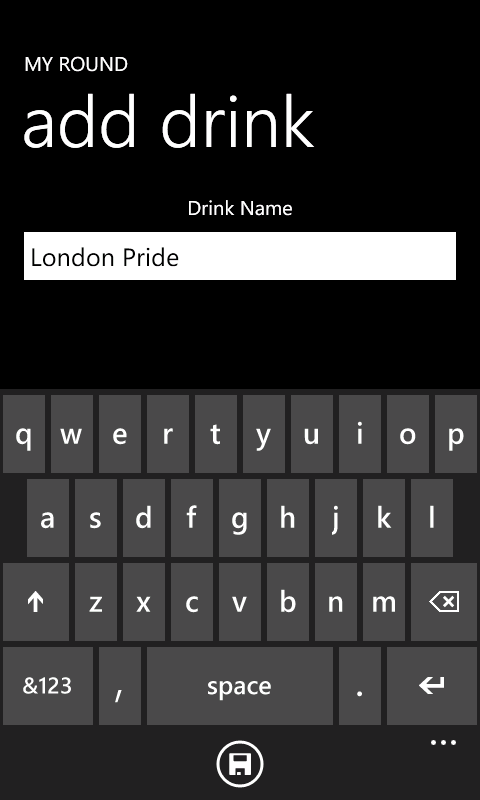
Windows Phone 7 UI Showing adding drink to list

Add drink to you list

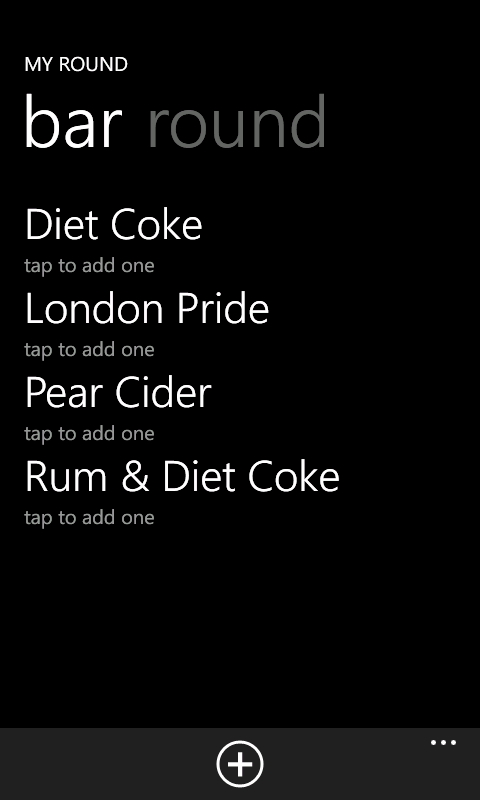
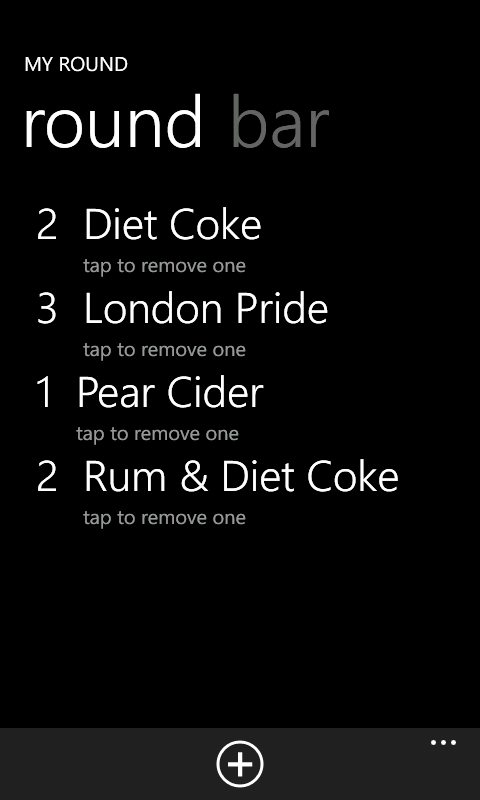
Once added the item will appear on the “Bar” page, plus add one to the “Drinks” page. You just need to swipe left and right to go between the two.

This is an example of the Bar Page.

My Round Bar page UI

My Round Bar page UI

And the round page.

My Round, Round Page UI

My Round, Round Page UI

Once a item is in the “Bar” list, just tap it to add it to the round. And on the round page, tap it to remove one of that item (or remove the item completely if there is only one left).

If you want to clear the round to start again. Go to the application bar menu and select clear. If you want to remove an item from the bar page, press and hold the item until a menu appears and select Remove.

To get hold of it, either search the market place for “My Round” or Click this link

Jas

2012/03/02

Databinding Fail on Windows Phone, if using a TextBox and an AppBar Button

Filed under: .NET, VB.NET, Windows Phone 7 — Tags: , , — vbmagic @ 10:14 pm

An annoying bug (Or Feature) of developing for Windows Phone 7.1.

I’ve been writing a Windows Phone 7.1 app that uses the MVVM model. I have a view that allows me to enter some text and the only other thing on the view is an App Bar button which saves the text.

From what I can gather, the data binding will cause an update once the text box has lost focus. But in this case pressing the App Bar button does not cause the text box to lose focus, so the data update doesn’t happen.

In my case it was an easy work around to give the TextBox a name and update the view model from within the code behind.


TextBox Text="{Binding Path=SomeText, Mode=TwoWay}" x:Name="aTextBox" Grid.Row="1"


_viewModel.SomeText = aTextBox.Text
_viewModel.Save()

But it sort of defeats the object of data bound items.

« Newer PostsOlder Posts »

Blog at WordPress.com.